
Download YooHoo – AI Greeting Card Maker, Free & Secure Design Tool
Overview
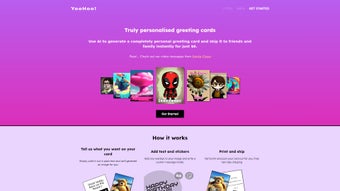
YooHoo! is a cutting‑edge, web‑based AI greeting‑card creator that transforms a simple text description into a polished, high‑resolution card design in seconds. The platform eliminates the need for traditional graphic‑design software by letting users type a brief prompt—such as “a cozy winter scene with twinkling lights for a holiday greeting”—and instantly receiving three AI‑generated illustrations that match the requested mood and style. After selecting the preferred image, creators can personalize the card further using an intuitive drag‑and‑drop editor that supports custom text, font choices, colour adjustments, and a vast library of themed stickers.
Once the design is finalised, YooHoo! offers a seamless end‑to‑end workflow: users can order a printed version on premium cardstock, which is then shipped directly to the recipient’s address worldwide. The service is free to try, provides a secure checkout, and works on any modern browser, making it an accessible solution for birthdays, anniversaries, holidays, or any occasion that calls for a heartfelt, custom‑made card. By combining AI creativity with integrated printing and secure data handling, YooHoo! delivers a fast, affordable, and user‑friendly experience that appeals to both casual senders and small businesses seeking professional‑grade greeting cards without the steep learning curve of traditional design tools.
Features & Benefits
- AI‑Generated Visuals: Describe the desired scene and receive multiple high‑resolution illustrations within seconds.
- Rich Text Editor: Add, resize, and style custom messages with a wide selection of fonts and colour palettes.
- Extensive Sticker Library: Hundreds of seasonal, celebratory, and thematic stickers to enhance any design.
- One‑Click Print & Ship: Integrated printing partner produces cards on premium cardstock and ships worldwide.
- Cross‑Platform Access: Works on Windows, macOS, Linux, Android, and iOS through any modern browser—no download required.
- Secure Payments & Data: PCI‑DSS compliant checkout and GDPR‑friendly data handling protect user information.
- Free Tier & Premium Plans: Generate up to three cards per month for free; paid plans unlock unlimited cards, priority printing, and faster shipping options.
Pros
- Instant AI designs eliminate the need for graphic‑design expertise.
- All‑in‑one workflow streamlines creation, printing, and delivery.
- Browser‑based access means no installation and full compatibility across devices.
- Generous free tier encourages casual users to experiment without cost.
- Robust security standards build trust for handling personal and payment data.
Cons
- Achieving highly specific designs may require multiple AI prompts and refinements.
- International shipping can become expensive, especially for premium cardstock.
- Offline use is not possible; a stable internet connection is mandatory.
Installation & Compatibility Guide
YooHoo! is a cloud‑native service, so there is no traditional software installation. All you need is a reliable internet connection and a modern browser that supports HTML5, CSS3, and WebGL (Chrome, Firefox, Edge, Safari, or Opera). Follow these steps to start creating your personalized cards:
- Visit the official site: Go to yoohoo.com and click the “Get Started” button.
- Create an account: Sign up with an email address or use a Google/Apple single‑sign‑on for faster access.
- Select a card type: Choose an occasion (Birthday, Holiday, Thank‑You, etc.) or begin with a blank canvas.
- Enter your prompt: Type a concise description like “a pastel garden birthday scene with balloons”. The AI will generate three variations in 10‑15 seconds.
- Refine the design: Pick the preferred illustration, then use the built‑in editor to add custom text, adjust fonts, change colours, or drag stickers onto the canvas.
- Preview & order: Review the final layout, select paper stock (standard or premium), and decide whether to download a digital PDF or place a print order.
- Secure checkout: Pay via credit card, PayPal, or Apple Pay. Free‑tier users can order up to three cards per month at no charge; premium users enjoy unlimited orders.
- Shipping: After payment, the partner printer produces the card and ships it within 2‑5 business days (standard) or 1‑2 days (express). International rates and delivery times vary.
Because YooHoo! runs entirely in the browser, it is fully compatible with Windows 10/11, macOS Ventura and later, Android 10+, iOS 14+, as well as Linux distributions and Chrome OS devices. No additional plugins or extensions are required, making it a truly universal solution for creating greeting cards on any platform.
Conclusion & Frequently Asked Questions
YooHoo! successfully merges artificial intelligence with a streamlined print‑and‑ship service, delivering a powerful yet approachable tool for anyone who wants to send personalized greeting cards without mastering complex design software. The AI engine handles the heavy lifting of illustration creation, while the editor provides all the flexibility needed for final touches. With a generous free tier, secure data handling, and worldwide printing capabilities, YooHoo! appeals to casual users, small businesses, and families alike.
The only notable drawbacks are the occasional need for multiple prompts to fine‑tune intricate designs and higher costs for international premium shipping. Overall, the platform offers excellent value for its price and sets a new standard for digital card creation. Ready to start sending AI‑crafted cards that impress?
Sign up now and experience the future of greeting‑card design.
Frequently Asked Questions
Is YooHoo! really free to use?
Yes. You can create up to three cards per month at no cost. Premium plans unlock unlimited creations, priority printing, and faster shipping.
Do I need any design skills to use YooHoo!?
No. The AI generates complete illustrations from a simple text prompt, and the editor provides drag‑and‑drop tools that require no prior experience.
Can I download a digital version instead of printing?
Absolutely. After finalizing your design, you can export a high‑resolution PDF or PNG for free and share it via email or social media.
How secure is my personal information?
YooHoo! follows PCI‑DSS standards for payment processing and GDPR guidelines for data privacy. Your address and payment details are encrypted and never shared with third parties.
What shipping options are available?
Standard (3‑5 business days) is included with all orders. Express (1‑2 days) and International options are available for an additional fee at checkout.
YooHoo! impresses with its AI creativity, intuitive editor, and hassle‑free delivery. The free tier is generous, and premium users benefit from unlimited cards and faster shipping. Minor drawbacks include occasional AI tweaking and higher international shipping costs, but overall it’s a standout tool for anyone who wants to send personalized cards without the usual design headache.



.png)



